|
|
Table of Contents |
|
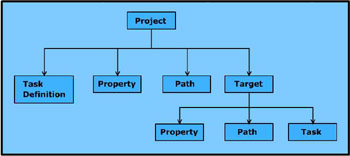
The Ant buildfile is an XML document with a root node, called project, which contains multiple interdependent targets. A target is a collection of tasks to execute a specific function. Targets may contain specific tasks as <task> tags that perform various actions of the build process. Figure 1-1 shows the directory structure of an Ant buildfile:
Listing 1-2 shows how to create the Ant buildfile:
 |
<?xml version="1.0">
<project name="myproj" default="compile" basedir=".">
<property name="src" value="."/>
<property name="build" value="build"/>
<target name="init">
<mkdir dir="${build}"/>
</target>
<target name="compile" depends="init">
<javac srcdir="${src}" destdir="${build}"/>
</target>
</project>
|
The above listing creates a buildfile that allows you to create a directory with the name specified by the build property. The <javac> task compiles all the .java files in the directory that the src property specifies and redirects the resultant .class files to the directory specified by destdir.
Some components act as the building blocks of the Ant buildfile. The components are:
Project
Built-in properties
Target
Task
Project is the building block of Ant, which defines multiple targets and any number of properties. The <project> tag is the root element of any buildfile, which indicates that for one buildfile, there is only one project block.
Table 1-4 lists the attributes of the <project> tag:
|
Attribute |
Description |
|---|---|
|
Name |
Specifies a name for the project. This attribute helps identify log output. |
|
Default |
Refers to a target name within a buildfile. The value is set to main, by default. If you run Ant without mentioning a target at the command line, Ant executes the default target. If the default target does not exist, Ant returns an error. |
|
Basedir |
Specifies the root directory of the project. This directory allows you to calculate all the relative paths. The default value of this attribute is set to the directory that contains the script. The script runs from the base directory. The buildfile usually exists in the "." directory. |
A property is inherent in an object. Built-in properties specify the default properties of Ant. The system properties are made available to Ant with the Ant installation. For example, ant.property.name, ant.java.version, ant.version, and basedir are various types of built-in properties. You can set properties either inside the buildfile using the <property> task or outside Ant.
The syntax for defining a property is:
<property name="propname" value="value1"/>
This syntax consists of the name of the property and the corresponding value of the property that specifies its characteristic.
The syntax for accessing a property is:
${propname}
Ant provides access to all the system properties that you can access from your own targets. For example, to assign the same name as that of the project to the JAR file, the syntax is:
<property name="jar.name" value="${ant.property.name}.jar"/>
Table 1-5 lists the built-in properties of Ant:
|
Built-In Propertie |
Description |
|---|---|
|
basedir |
Specifies the absolute path of the base directory of the current project. |
|
ant.file |
Specifies the absolute path of the buildfile. |
|
ant.version |
Specifies the version of Ant. |
|
ant.project.name |
Specifies the name of the project that is currently running. |
|
ant.java.version |
Specifies the JVM version that Ant detects. |
Calling system.getProperties() in Java makes some optional, built-in properties of Ant available. Some of these properties are:
os.name: Specifies the name of the operating system on which Ant runs.
os.version: Specifies the version of the operating system on which Ant runs.
java.class.path: Specifies the classpath that Ant uses.
user.home: Specifies the home directory of the current end user.
Target is the main building block of Ant that consists of a sequence or block of tasks to attain a specific goal. For example, the target of a buildfile is to compile a set of files and to package them into a JAR file. You can use various types of targets in your buildfile.
Table 1-6 lists the various types of targets:
|
Target |
Description |
|---|---|
|
init |
Encapsulates all the property definitions that help keep all the tasks at the same level. |
|
dependent |
Checks if all the dependent targets are present and results in a build failure, if any dependent target is missing. |
|
compile |
Compiles source files to create class files and copies property files from the source tree to the class subdirectories. |
|
unittest |
Prompts the execution of unit tests. |
|
Filter |
Checks if the unit tests are complete before creating JARs. |
|
Jar |
Builds multiple JAR files that contain the class files and property files required by an application. |
|
Clean |
Eliminates all the primary generated Java artifacts, such as the directory that contains the class, JAR, Web Archives (WAR), or Enterprise Archives (EAR) files from the development directories. |
|
Javadoc |
Compiles the dynamically produced code documentation with the JavaDoc tool. |
Target contains specific attributes to control the operations of the buildfile. Table 1-7 lists the attributes of Target:
|
Attribute |
Description |
Required |
|---|---|---|
|
name |
Specifies a name for the target. |
Yes |
|
depends |
Specifies the comma-separated list of targets on which the target depends. This attribute results in the execution of the list of specified targets before the execution of this target. |
No |
|
if |
Specifies the name of the property that must be set to trigger the target for action. |
No |
|
unless |
Specifies the name of the property that must not be set to trigger the target for action. |
No |
|
description |
Provides a summary of the functioning of the target. |
No |
A target depends on other targets. For example, if you have one target for compiling and another for creating a distributable file, you cannot create a distributable file unless compilation is complete. The distributable target depends on the compilation target. You can run a target only one time in a session. The following code shows the dependence of one target on another:
<target name ="X">
<target name ="Y" depends="X"/>
<target name ="Z" depends="Y"/>
The above code first executes target X, then target Y, and finally target Z. Ant runs the targets present in the depends attribute in the order in which they appear.
Ant tasks are Java classes that help perform various functions, such as compiling source code, packaging classes, attaining file versions from CVS, copying files and directories, compressing files, or changing the permissions of a file. Ant tasks can acquire any number of attributes. The tasks are run inside the target.
The syntax of an Ant task is:
<taskname atbtype="value1" atbtype="value2"...>
This syntax consists of the name of the task, taskname, type of attribute, atbtype; and the corresponding value of the attribute that specifies the functioning of the ANT task.
For example, to provide the write permission to a group and the file owner of a particular file, the syntax is:
<chmod="abc.txt" perm="uo+w"/>
Ant contains the following three types of tasks:
Core tasks: Are available with the core distribution of the Ant installation. For example, the <jar> task is a core task that helps package JAR files.
Optional tasks: Require extra JAR files for execution. For example, the <telnet> task is an optional task that requires the common-net.jar file for execution. The <telnet> task helps interact with remote Telnet servers.
User-defined tasks: Are developed for a specific purpose. You can modify Ant tasks according to your needs by adding a new Java task class.
Ant analyses the buildfile’s XML and processes each XML element sequentially. After creating the buildfile, you need to execute it to perform specific functions. The execution process of the buildfile takes place by parsing the elements and executing the targets. The two levels to execute the Ant buildfile are:
Project level: Ant performs a breadth-first traversal of the XML elements present in the <project> tag before moving to the target level.
Target level: Ant performs a depth-first traversal of the XML elements present in the <target> element. Ant processes each element completely before processing the next element.
Ant follows the hierarchical tree structure of the XML library during element processing. Ant performs the syntactical checking of elements before processing any element at project level. If the element is syntactically correct, Ant processes the complete life cycle of the element. During the processing of an element, the two distinct types of errors that might occur are:
Project-level errors: Occur at project level when Ant performs a breadth-first traversal of XML elements. Ant loads all the elements in the buildfile. At the project level, Ant processes every element type, such as project-level tasks or data types, except targets. At this level, errors might occur when:
Reading the elements of the data type.
Executing the operations of the data type.
presence of any syntax or processing error causes the build to halt and fail. For example, if Ant discovers a specific element that is not a subelement of <project>, an error occurs that immediately halts the build. By default, Ant stops the build process at the occurrence of the first error it encounters. As a result, Ant discovers each error one at a time with every execution. In addition, Ant does not support the rollback concept. You should carefully edit a working buildfile for a stable project.
Target-level errors: Occur at target level when Ant performs a depth-first traversal of XML elements. Ant loads and processes each element in the <target> element at the target level one at a time. As a result, the order of processing elements is significant because when Ant starts processing the second element, it implies that the operations with the first element were successful. The errors occurring at target level have the same consequences as the errors at the project level.
The following code shows an invalid buildfile:
<project name="abc" basedir="." default="all">
<property naame="oblivion" value="nil"/>
<falsetag/>
</project>
The above code results in an unsuccessful build that causes Ant to halt because of the presence of an invalid attribute, naame. Ant does not show any error message for the <falsetag/> element because Ant stops with the occurrence of this error.
Ant processes all project-level elements, such as property, path, taskdef, patternset, filterset, mapper, and target, before executing any targets. In the buildfile, project-level data elements consist of the properties that specify the directories, the global property for the javac task, and the compilation classpath as a path DataType. Ant processes these elements in the sequence in which they appear, making them globally available to the complete buildfile.
You cannot modify the name-value pair of a property element after processing it for the first time. Ant specifies an order of precedence for declaring properties. Properties declared at Ant's command line are of higher priority than properties defined elsewhere. Ant then determines the precedence of properties based on which declared property it encounters.
When you execute Ant with no command-line options, Ant processes the <project> tag and uses the default attribute to attain the target to execute the tasks. The targets present in the buildfile contain specific tasks that perform various operations, such as copying or removing files or directories.
|
|
Table of Contents |
|