

|
|
|
Retrieving File Information
It is rather unusual to use PHP for accessing directory and file informationat least as long as the vast majority of PHP scripts run via HTTP in a web server and not using the command line interface (CLI) or PHP. However, PHP offers a variety of helper functions that provide information about a file. Most of them are just calling the relevant operating system functions. Reading Information About Files (fileinfos.php)
<?php
  $filename = __FILE__;
  $data = array(
    'fileatime' => fileatime($filename),
    'filegroup' => filegroup($filename),
    'filemtime' => filemtime($filename),
    'fileowner' => fileowner($filename),
    'filesize' => filesize($filename),
    'is_dir' => var_export(is_dir($filename), true),
    'is_executable' =>
var_export(is_executable($filename), true),
    'is_file' => var_export(is_file($filename),
       true),
    'is_link' => var_export(is_link($filename),
       true),
    'is_readable' => var_export(is_readable
       ($filename), true),
    'is_uploaded_file' => var_export
       (is_uploaded_file($filename), true),
    'is_writable' => var_export
       (is_writable($filename), true)
  );

  echo '<table>';
  foreach ($data as $function => $result) {
    echo
"<tr><td>$function</td><td>$result</td></tr>";
  }
  echo '</table>';
?>
The following list shows the most relevant helper functions in this regard: Another set of helper functions also takes a filename, so the files do not have to be opened before you use these functions:
Figure 6.5 contains the result of the code at the beginning of this phrase. Figure 6.5. Information about the current script (fileinfos.php).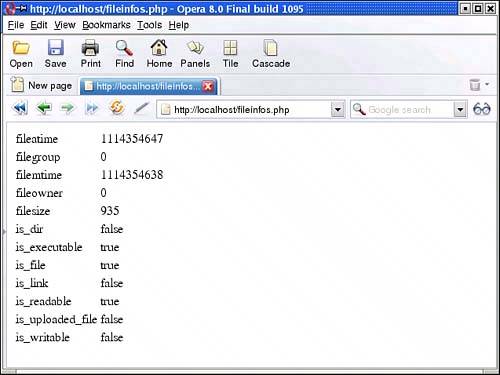  |
|
|
|