|
|
Table of Contents |
|
Ant is a Java -based build tool that allows you to automate the build process of an application. Ant is a command-line driven program that uses an XML file to describe the build process of an application. Ant uses an XML-based buildfile with a root node, called project, and other nodes, such as targets, tasks, and data types, to store the build information.
The sample application in this chapter is a chat room application. This distributed application contains various client/server and peer-to-peer interactions.
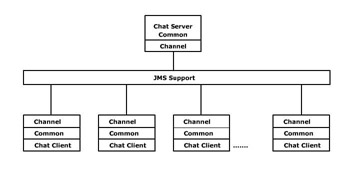
Figure 5-1 shows a block diagram of the chat room application:
The Java Message Service (JMS) Application Programming Interface (API) is a messaging standard that allows applications based on Java 2 Platform to create, send, receive, and read messages. The Channel component isolates the JMS layer from the application. The chat server provides the clients with a current list of active topics for the chat. Both the server and the client depend on a common set of objects. To build the sample application:
Set up the build environment.
Specify Ant properties.
Specify build targets.
Build the channel component.
Create and build the sample application.
Build the sample application.
Run the sample application.
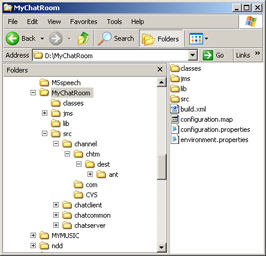
You develop the chat room application in a project directory, MyChatRoom, which contains the classes, src, lib, and jms subdirectories, as shown in Figure 5-2:
|
|
Table of Contents |
|